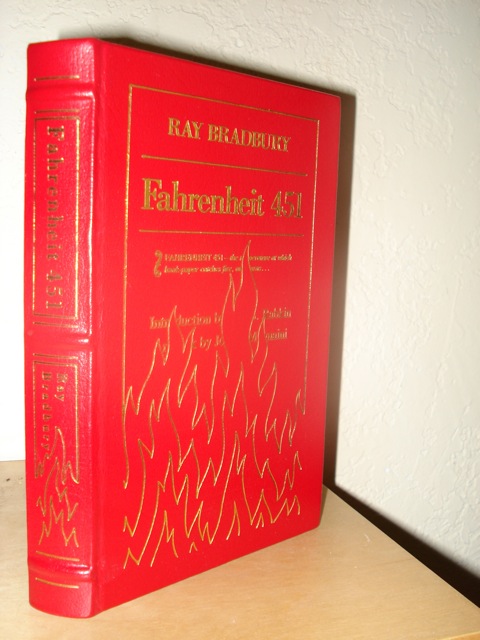
The passing of Ray Bradbury was the first time a “celebrity” death that caused me to actually pause and take a moment to reflect. No man outside of my own personal sphere of influence has had more affect on my life than him. His collected works have literally changed my life, so I thought I would take a moment to send a few words of thanks into the Ether.
The following is an excerpt from an essay I wrote 7 or so years ago in a college English class.
In high school, I went through a long period without reading. Something about being told what to read, when to read it, and how to write made me feel like the literary world was an exclusive club, and I wanted nothing to do with it. So, I put down my books, picked up the notes of a man named Cliff, and began to read only what was necessary. Not until recently did I re-discover the true value of books.
I was once assigned the book, Lord of the Flies, and I loved it as I read a few chapters. But the time came for us to write our first analytical essay and I had not read all the chapters assigned. I was much too busy with my other classes and did not allot any time for reading. I was too busy watching Saturday movies on TBS. So, I found the cliff notes and never picked up the book again.
What made me deprive myself of such priceless commodities? I believe Ray Bradbury said it best: “Among librarians and teachers there was then, and there still somewhat dimly persists, an idea, a notion, a concept that only Fact should be eaten with your Wheaties . . . Fantasy, even when it takes science-fictional forms, which it often does, is dangerous. It is escapist. It is day-dreaming . . . So said the snobs who did not know themselves as snobs.”
The first novel I ever read was the first in Asimov’s “Norby” series. I instantly fell in love. Every book I voluntarily read after that was science fiction. I entered a new world with every book, and in doing, fed my own imagination like a starving beast, but in the sophomore year of High School, my worlds were demolished.
No more dreams; no more fantasy; no more science fiction.
Read, think, analyze.
Facts, reality, structure.
No more dream worlds; no more freedom.
My love for books quickly diminished, while my hatred for school and similar institutions grew exponentially. I watched a lot of movies, but stayed away from anything too intelligent or thought provoking. I was not about to learn anything I did not want to.
Years later, I finally broke through the literary bars school had built around me. My first year of college, I developed a love for music, which I nurtured throughout my two year break from schooling as a missionary for my church. Not permitted to listen to “popular” music, I was forced to go back to the beginning of music, a time when music was done out of a love of art, not a love of money. Artists like Mozart, Tchaikovsky, Chopin and later Miles Davis gave me a love for art, poetry, and philosophy, and more importantly, I began to write again. In a world so full of structure and rules that bound every missionary, with my mind finally free, my body knew no walls.
Upon return, I returned to books. I entered my new life reading Great Expectations. It all came flooding back: Emerson, Thoreau, Shakespeare, Poe, then Mark Twain, “I will never let schooling interfere with my education” — a man after my own heart. I read all the books I had shunned like lepers in my earlier schooling and devoured every punctuation mark. No one told me how to read them.
Then came the book that seemed to personify my feelings for the past few years, Fahrenheit 451. My re-discovery of books was complete. I was a writer again. Not because anyone told me I was, for no one else would ever even know, but my heart declared it so.
I truly identified with Bradbury. He describes his youth full of movies that created pictures and worlds in his mind that remained forever. My youth is the same. The world in which I live is one of fantasy. My memories are scenes cut from a movie. Life, as my mind sees it, is a John Woo film, full of action, huge special effects, and random symbolism. To the mind, my eyes are but cameras recording the images around them, transporting them into the realms of my dream world. I have recently drowned myself in art of many forms: music, art, poetry, books, and film. My mission now: to use this exposure to create my own fantastic worlds of fantasy.
I now welcome art in all its forms, especially film. Film captures the imagination in a way that nothing else can. It combines the visual aesthetics of art with the aural aesthetics of music and the intellectual aesthetics of books. Yet it captures every bit of emotion found in each element. My favorite movies are ones that get all your senses going, movies like Citizen Kane, beautiful works of art; or movies like Dark City, or Being John Malkovich that get your mind going and keep you thinking long after you leave the theater.
The first dream I ever dreamed in my life was to become a writer. Created in my earliest days in the far away land of Indonesia, this dream resulted from a teacher that left me free to dream and to record these dreams on paper. This dream quickly faded though, as other teachers erected walls around my creativity and imagination. Books and art tore down these walls and gave me desire to write once again and with the help of Bradbury, I now know how to keep these walls down, never to encage my mind again.
I don’t write as much as I should. Writing is directly related to my happiness. It’s the only way I know how to truly express myself. To know my writing is to know me. The more I read, the more I desire to write and it was Bradbury that first instilled that drive in me. Whenever I find myself in a funk, I pull out one of his short stories and before long, I’m writing my way out of the funk.
Thank you, Mr. Bradbury, for helping me keep the destroyers at bay.